 Jotform
Resignation Acknowledgment Template
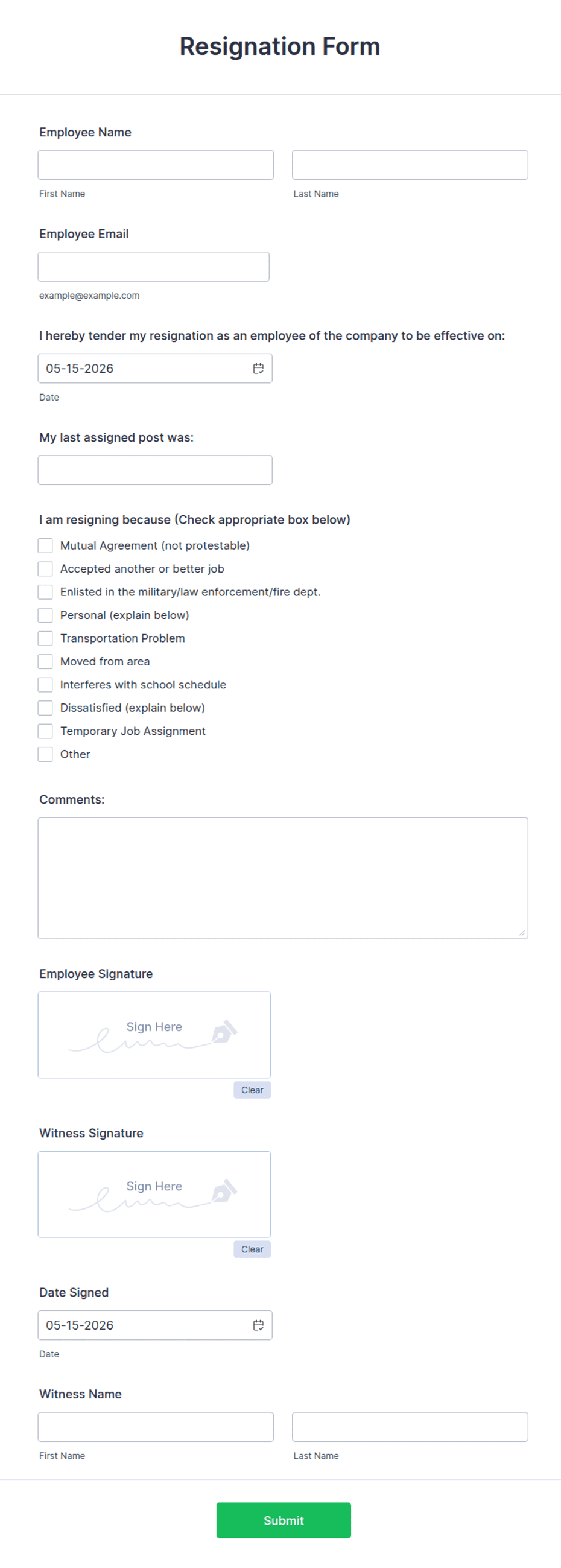
Resignation acknowledgment recording an employee's departure — position, last working day, optional reason, handover notes, and dated signatures from the employee and employer.
Available online on
Download as
- Free PDF and Word downloads for offline use
- Fillable fields you can customize for your business
- Share a link or print copies for in-person sign-ups
- Ready-made online forms on popular form builders
Last updated July 18, 2026. Reviewed by the Online Signature Forms team.
About this template
A Resignation Acknowledgment records that an employer has received and accepted an employee's resignation, and captures the key facts of the departure in one place — the position, the last working day, an optional reason, and the handover arrangements. HR teams and managers use one to confirm the leaving date in writing, avoid confusion about notice, and make sure knowledge is handed over before the employee goes. Typical fields include the employee name and position, the resignation and last working dates, an optional reason, handover notes, and a dated signature from both the employee and the employer.
The two signatures are what settle the record: they confirm both sides agree on the departure terms and the final date. That is why this layout keeps the departure details clear and places a two-party signature block at the end, with printed name, signature, and date lines. To be clear, this is a general-purpose layout, not legal or employment-law advice. Notice periods, final-pay rules, and resignation requirements vary by country and state, so have your HR team or an attorney review the wording before you use it.
How teams use this form
A manager uses the form to acknowledge a resignation the same day it is received, confirming the last working day so payroll and scheduling can plan. An HR team records handover notes — accounts to reassign, documents to transfer, a client list to update — so nothing is lost when the person leaves. A small business keeps a signed copy per departure as the record that both sides agreed on the leaving date. The common thread: the acknowledgment removes ambiguity from an otherwise informal moment.
Customize it before signing
Open the Word (DOCX) download to adjust the fields, make the reason optional or remove it, and expand the handover section to match your offboarding checklist. Insert your company name and logo, and add lines for return of equipment or final-pay details if your process needs them. The fillable PDF suits signing on paper or on a device without shifting the layout; keep the two-party signature block intact so the record is complete and dated.
Common mistakes to avoid
Do not leave the last working day blank — it is the single most important detail for planning and pay. Do not pressure an employee to state a reason; keep that field optional. Do not skip the handover notes, since undocumented knowledge is the thing most often lost in a departure. And do not forget that both parties sign: the acknowledgment works because both the employee and the employer agree on the same facts.
Example scenario
An employee gives two weeks' notice by email. The manager fills in the form with the position, the resignation date, and the last working day, notes that the employee will document their active projects and transfer shared files, and leaves the reason blank at the employee's request. Both sign and date the form and each keeps a copy. Offboarding then proceeds against a clear, agreed record.
Choosing PDF or Word
This page provides a printable fillable PDF and an editable Word (DOCX) file. Use the Word file when you need to adjust the fields or expand the handover section, and the PDF when the details are set and you just need to fill and sign. Both include a dated, two-party signature block for the employee and the employer.
Typical fields
- Employee name
- Position / job title
- Department and reporting manager
- Resignation date (notice given)
- Last working day
- Reason for leaving (optional)
- Handover notes and transition tasks
- Employee signature, printed name, and date
- Employer signature, printed name, title, and date
Best for
- Confirming a resignation and last working day
- Recording handover and transition tasks
- HR offboarding and departure files
- Managers acknowledging notice in writing
When to use PDF vs online
Use the PDF or Word download for in-person sign-ups, fax, or email attachments. Choose an online form when you need automatic notifications, payment integrations, or a shareable link for customers.