 Jotform
Rental Application Template
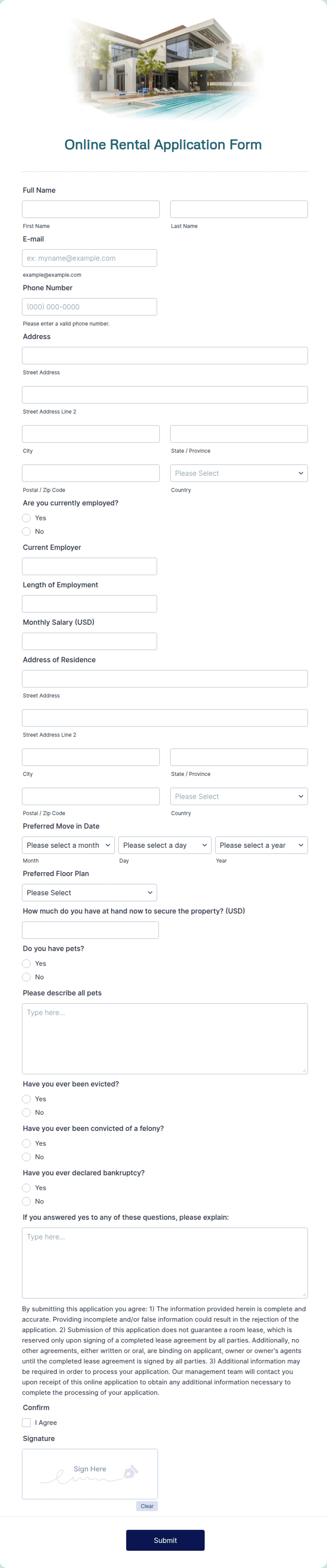
Rental application for tenant screening with applicant details, rental history, employment, income, references, and a signed consent to background and credit checks.
Available online on
Download as
- Free PDF and Word downloads for offline use
- Fillable fields you can customize for your business
- Share a link or print copies for in-person sign-ups
- Ready-made online forms on popular form builders
Last updated July 18, 2026. Reviewed by the Online Signature Forms team.
About this template
A Rental Application is the form a prospective tenant completes so a landlord can screen them before offering a lease. It gathers the applicant's personal details, current and previous addresses, rental history, employment and income, and references, and it ends with the applicant's signed consent to run a background and credit check. Landlords, property managers, and leasing agents use it to compare applicants fairly and consistently, and to keep a documented, signed record of the permission a tenant gave to verify their information.
Screening is heavily regulated, and the rules are very local. Fair-housing law, credit-reporting requirements, application-fee limits, and what you may and may not ask vary by state and city. This template is a clean, general-purpose layout, not legal advice. Check your state and city rules and required disclosures before you use it, and be sure the consent language matches what your screening provider and local law require.
How landlords and tenants use this form
A landlord hands the application to everyone who tours a unit so each applicant provides the same information. A property manager uses the employment and income section to confirm an applicant meets an income-to-rent ratio before scheduling a second showing. The references section lets a leasing agent call a prior landlord to confirm the applicant paid on time and gave proper notice. Because the applicant signs and dates the consent line, the landlord has clear, documented permission before pulling any report.
Customize the terms before signing
Open the Word (DOCX) download to add your logo, adjust the fields you collect, and edit the consent paragraph to match your screening provider and local disclosure requirements. Add or remove reference rows, note any application fee, and tailor the employment section to your market. The fillable PDF is ideal when the fields are set and an applicant just needs to complete the blanks and sign — keep the consent checkbox and signature line intact so the permission is captured.
Common mistakes to avoid
Do not run a background or credit check without a signed consent — that is the single most important line on the form. Do not ask questions that fair-housing law prohibits; when in doubt, leave them off. Do not lose track of application fees or required disclosures, which are capped or mandated in many places. And do not forget the date beside the signature, since consent is tied to when it was given.
Example scenario
Three applicants tour the same apartment. Each completes the application with their rental history, employer, monthly income, and two references, then checks the consent box and signs. The landlord verifies income, calls the prior landlords listed, and — with signed permission in hand — runs credit checks on the finalists. Because every applicant filled out the same form and signed the same consent, the landlord can compare them consistently and document a fair decision.
Choosing PDF or Word
This page provides a printable fillable PDF and an editable Word (DOCX) file. Use the Word file when you need to adjust the fields or rewrite the consent language before printing, and the PDF when the form is set and an applicant just needs to fill and sign. Both include the consent checkbox and a dated signature line so the applicant's permission is captured clearly.
Typical fields
- Applicant full name, phone, and email
- Date of birth and government ID
- Current address and rental history
- Employer, position, and monthly income
- Personal and prior-landlord references
- Number of occupants and pets
- Consent to background and credit check (checkbox)
- Applicant signature and date
Best for
- Landlords screening prospective tenants
- Property managers processing applicants
- Leasing agents comparing applications
- Documenting consent before a background check
When to use PDF vs online
Use the PDF or Word download for in-person sign-ups, fax, or email attachments. Choose an online form when you need automatic notifications, payment integrations, or a shareable link for customers.