 forms.app
Equipment Rental Agreement Template
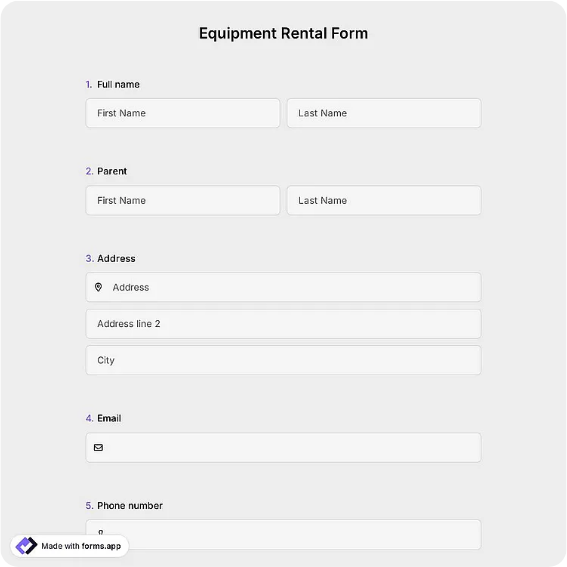
Equipment rental agreement between an owner and renter, with equipment description, rental period, rate and deposit, condition and return terms, a liability statement, and dated signatures from both parties.
Available online on
Download as
- Free PDF and Word downloads for offline use
- Fillable fields you can customize for your business
- Share a link or print copies for in-person sign-ups
- Ready-made online forms on popular form builders
Last updated July 18, 2026. Reviewed by the Online Signature Forms team.
About this template
An Equipment Rental Agreement sets out the terms when an owner rents a piece of equipment to a renter for a defined period. It names both sides, describes the equipment precisely, states the rental period, the rate, and the deposit, and lays out the condition at handover, the return terms, and who is responsible for damage or loss while the equipment is out. Tool-rental shops, party and event suppliers, construction and landscaping firms, camera and AV houses, and anyone lending gear peer-to-peer use one so the expectations are written down and both parties know what happens if something goes wrong.
The signatures are the point: they confirm the owner and renter agree on the equipment, the dates, the money, and the responsibility for damage before the gear leaves the owner's hands. That is why this layout pairs a detailed equipment-description block with a rental-period and rate-and-deposit section, a condition-and-return block, a plain liability statement, and a dated two-party signature section. This is a general-purpose layout with the sections most rentals need, not legal advice; liability, insurance, and deposit rules vary by jurisdiction and equipment type, so have an attorney review the wording for high-value or hazardous equipment.
How teams use this form
A tool-rental shop writes one for every powered tool that leaves the counter, recording the serial number, the daily rate, the deposit, and the return date. A wedding supplier rents tables, linens, and a sound system and notes the condition out and the replacement cost for anything damaged. A contractor lending a mini-excavator to another crew records the hours, the rate, and who carries insurance. The signed copy protects the owner if the equipment comes back damaged or late and gives the renter a clear record of what they agreed to.
Customize the terms before signing
Open the Word (DOCX) download to edit the equipment fields, set your own rate and deposit, and adjust the condition, return, late-fee, insurance, and liability language before printing. Name both parties, describe the equipment by type, make, model, and serial number, and record its condition at handover. The fillable PDF is ready to sign on paper or a device — keep the liability statement and the dated signature lines intact so the finished agreement is complete.
Common mistakes to avoid
Do not describe the equipment loosely — a serial number and a condition note remove doubt about exactly what was rented and how it left. Do not leave the rental period, rate, or deposit blank, since those drive the whole arrangement. Do not skip the liability and damage terms, which decide who pays if the gear is broken or lost. And do not forget that both parties sign and date: the agreement only binds once the owner and renter have both signed.
Example scenario
A party-rental company rents a PA system and two speakers for a weekend event. The agreement records the make, model, and serial numbers, the Friday-to-Monday rental period, the daily rate, a refundable deposit, and the condition of each item at pickup, plus a statement that the renter is responsible for damage or loss. Both sign and date two copies. When the gear comes back on time and undamaged, the owner returns the deposit against the signed condition record.
Choosing PDF or Word
This page offers a printable fillable PDF and an editable Word (DOCX) file. Use the Word file to adjust the equipment fields, add insurance or late-fee terms, or rewrite the liability language before printing, and the PDF when the details are set and you only need to fill and sign. Both include the equipment description, rental period, rate and deposit, and dated owner and renter signatures so the rental is properly recorded.
Typical fields
- Owner name and contact
- Renter name and contact
- Equipment description (type, make, model)
- Serial number and quantity
- Rental period (start and return dates)
- Rental rate and payment terms
- Security deposit amount
- Condition at handover and return terms
- Liability and damage/loss statement
- Owner signature and date
- Renter signature and date
Best for
- Tool and equipment rental shops
- Party, event, and AV suppliers
- Construction and landscaping crews
- Peer-to-peer gear lending
When to use PDF vs online
Use the PDF or Word download for in-person sign-ups, fax, or email attachments. Choose an online form when you need automatic notifications, payment integrations, or a shareable link for customers.