 Jotform
Video Release Form Template
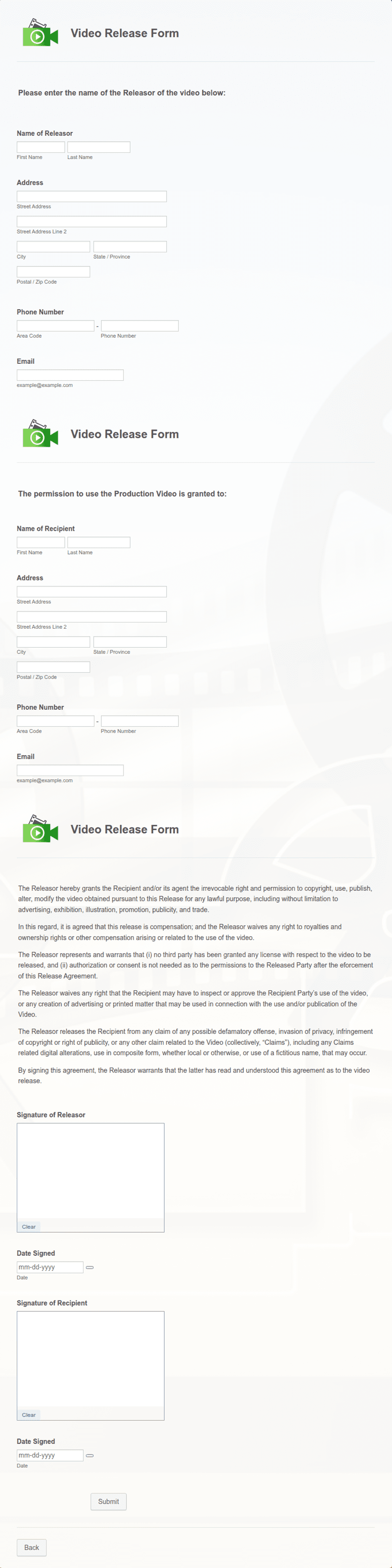
Video release granting permission to record and use footage of a participant, with participant and project details, the usage scope, a release statement with acknowledgment checkbox, and a dated signature.
Available online on
Download as
- Free PDF and Word downloads for offline use
- Fillable fields you can customize for your business
- Share a link or print copies for in-person sign-ups
- Ready-made online forms on popular form builders
Last updated July 18, 2026. Reviewed by the Online Signature Forms team.
About this template
A Video Release Form is a signed statement in which a participant grants permission to record video of them and to use that footage in a specified project. Nonprofits, schools, marketing teams, event organizers, and content creators use one so recordings can be edited, published, and shared with documented consent from everyone who appears on camera. Typical fields include the participant's name and contact details, a description of the project or recording, the grant to record and use the video, the usage scope, a release statement, an acknowledgment checkbox, and a dated signature — plus a guardian section when the participant is a minor.
Because video is often published online and reused across channels, the record of consent matters, so this layout places the grant and release statement above the signature block, with an acknowledgment checkbox and a guardian line. To be clear, this is a general-purpose layout with the sections most video releases include — not legal advice. Publicity and image-rights rules vary by state, and consent for a minor works differently from an adult's, so have an attorney review the grant and release wording before you rely on it.
How teams use this form
A nonprofit collects a signed release from each person featured in a fundraising video so it can share the story publicly. A conference has speakers and attendees sign before recording sessions for on-demand replay. A marketing team gathers releases from customers before using testimonial footage in ads. The common thread: no signed release, no publishing the video.
Customize the statement before signing
Open the Word (DOCX) download to describe the project precisely and define the usage scope — the channels, territory, and duration your project needs. Add your organization's name and logo, adjust the guardian language for minors, and tailor the release statement to how and where the video will appear. The fillable PDF is ready to sign on paper or on a device; keep the acknowledgment checkbox and signature lines intact so the release is complete.
Common mistakes to avoid
Do not leave the usage scope vague — name the channels and how long the footage may be used so there are no surprises later. Do not skip the project description, which anchors what the participant is agreeing to. And do not let a minor sign for themselves: a parent or legal guardian must complete the guardian section and sign. Collect the release before or at the recording, not after the video is already live.
Example scenario
A community theater films a promotional video with cast members and volunteers. Before rolling, each participant fills in their details, reads the project description and the usage scope (the theater's website and social channels for one year), ticks the acknowledgment box, and signs with the date. For a 15-year-old volunteer, a parent completes the guardian section and signs as well. The theater keeps the releases so the finished video can be published without concern.
Choosing PDF or Word
This page provides a printable fillable PDF and an editable Word (DOCX) file. Use the Word file when you need to describe the project, set the channels, territory, or duration, or reword the release before printing, and the PDF when the terms are set and you just need participants to fill and sign. Both include the acknowledgment checkbox, a guardian section for minors, and dated signature lines so the release is ready to use.
Typical fields
- Participant name and contact details
- Project or organization name
- Description of the recording
- Grant to record and use the video
- Usage scope (channels, territory, duration)
- Release statement and acknowledgment checkbox
- Guardian name and relationship (if participant is a minor)
- Participant signature and date
- Parent / guardian signature and date
Best for
- Nonprofit and fundraising videos
- Conferences and recorded sessions
- Marketing and testimonial footage
- Community and event recordings
When to use PDF vs online
Use the PDF or Word download for in-person sign-ups, fax, or email attachments. Choose an online form when you need automatic notifications, payment integrations, or a shareable link for customers.